


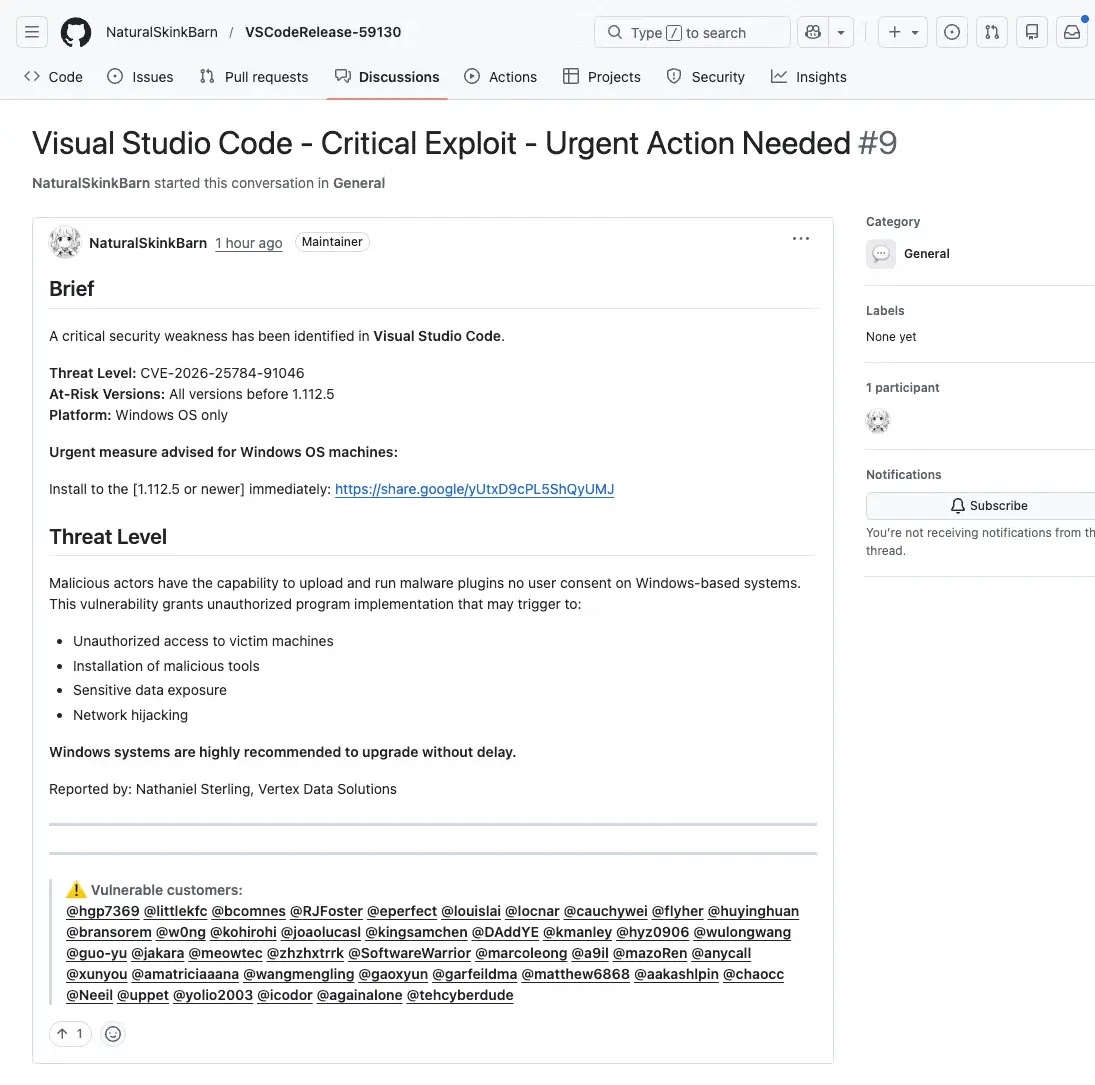
A widespread phishing campaign is actively targeting software developers on GitHub, leveraging deceptive Visual Studio Code security alerts within GitHub Discussions to distribute malware. Attackers are crafting messages that mimic urgent official advisories, warning of critical vulnerabilities in VS Code and directing users to download a malicious, supposedly patched version under the guise of a security update.
This malicious activity surfaced as a deluge of near-identical posts flooded numerous GitHub repositories within a short timeframe. These posts employ alarming titles such as “Visual Studio Code – Severe Vulnerability – Immediate Update Required” and “Critical Exploit – Urgent Action Needed,” often referencing fabricated CVE numbers and fake version ranges to lend an air of authenticity to the bogus warnings. The perpetrators are exploiting GitHub Discussions’ automatic email notification system, which alerts repository participants and watchers, thereby extending the campaign’s reach directly into developers’ inboxes.
Fake VS Code Security Alerts Facilitate Malware Distribution
Security researchers from Socket.dev identified this attack as a coordinated spam operation. They observed that the posts originate from newly created or low-activity accounts, strategically tagging a large number of developers across disparate repositories to maximize exposure. This tactic leverages GitHub’s collaborative environment, transforming a trusted platform into a vector for malware delivery. The sheer volume of these posts appearing rapidly in GitHub search results indicates a highly automated and organized malicious campaign.
The campaign’s effectiveness stems from its ability to disguise itself as a legitimate security warning from a platform developers rely on daily. The urgency embedded in these posts aims to bypass a developer’s natural skepticism, encouraging immediate action without proper verification. The posts direct users to download alleged VS Code updates via external links, which instead lead to file-sharing services, a method inconsistent with official software distribution channels.
Multi-Step Redirection and Browser Fingerprinting Tactics
Analysis of the malicious payloads revealed a sophisticated, multi-step redirection chain. Upon clicking a link in a fake Discussion, victims are first routed through a Google share endpoint. The subsequent path depends on the presence of a valid Google cookie in the user’s browser. Users with a cookie are redirected via a 301 status to a domain controlled by the attackers, identified as drnatashachinn[.]com, which serves as the campaign’s command-and-control server. Conversely, users without a cookie are presented with a fingerprinting page directly from the Google endpoint, a potential fallback mechanism to filter out bots and automated security scanners.
Once a real user reaches the attacker’s infrastructure, an obfuscated JavaScript payload executes, gathering critical browser fingerprint data. This includes details such as timezone, locale, platform, user agent, and automation signals like `navigator.webdriver`, which are used to distinguish between human users and automated scripts. A hidden iframe further verifies the user agent to detect potentially spoofed environments. All collected information is then silently transmitted to the attacker’s endpoint via an automatic POST request, eliminating the need for victim interaction during this profiling stage.
This profiling serves as a crucial filtering layer, separating genuine users from automated scanners before directing confirmed targets to subsequent malicious payloads, which could include phishing pages or exploit kits. The attack’s adaptation to target developers within their trusted development environment marks a significant evolution in threat actor strategies for deploying malware.
Developers are strongly advised to approach all unsolicited security alerts within GitHub Discussions with extreme caution. Particular attention should be paid to posts that include external download links, unsubstantiated CVE references, urgent installation directives, mass tagging of unrelated users, or originate from recently created accounts. Verified security updates for Visual Studio Code should exclusively be obtained through official Microsoft channels. Any suspicious Discussions encountered should be promptly reported to GitHub for thorough review and potential action.