


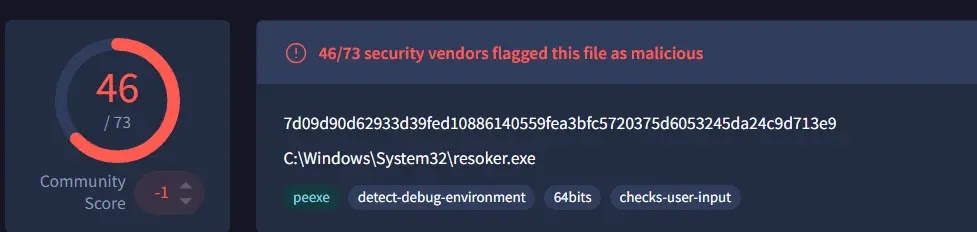
A new malicious software, dubbed ResokerRAT (Remote Access Trojan), has emerged, leveraging Telegram’s bot API to discreetly control and monitor infected Windows systems. This stealthy approach bypasses traditional command-and-control servers by utilizing the popular messaging platform, making it significantly harder for conventional network security tools to detect. The malware’s primary function involves establishing persistence and executing remote commands, including capturing screenshots of user activity.
ResokerRAT is distributed as an executable file named Resoker.exe. Upon execution, the malware operates silently in the background. Its initial actions include setting up mechanisms for long-term presence on the compromised system, seeking elevated administrative privileges, and preparing to receive and execute instructions from malicious actors. Security analysts at K7 Security Labs have detailed its capabilities, which extend to disabling critical Windows security features and blocking user access to essential diagnostic tools like the Task Manager.
Understanding ResokerRAT’s Functionality and Stealth Tactics
The initial execution of Resoker.exe triggers a series of anti-analysis and privilege escalation attempts. According to K7 Security Labs, one of the malware’s first steps is to create a unique mutex, named “GlobalResokerSystemMutex,” using the Windows CreateMutexW API. This mutex acts as a flag to prevent multiple instances of the malware from running simultaneously on a single machine, ensuring its operation remains singular and controlled.
Furthermore, ResokerRAT employs anti-debugging techniques. It utilizes the IsDebuggerPresent function to check if a debugger is attached to its process. If it detects an active debugger, signaling an analyst’s attempt to scrutinize its behavior, the malware triggers a custom exception to disrupt the analysis process. This self-preservation tactic is common among advanced malware families aiming to evade detection by security researchers.
To achieve enhanced system access, ResokerRAT attempts to relaunch itself with administrator privileges. It achieves this by invoking the ShellExecuteExA function with the “runas” option. If this privilege escalation is successful, the original instance of the malware terminates, and the elevated process assumes control. Conversely, if the elevation fails, the malware reportedly sends an error notification back to the attacker via its Telegram bot. The malware also exhibits an aggressive stance towards security tools, actively scanning for and terminating processes associated with Task Manager (Taskmgr.exe), Process Explorer (Procexp.exe), and Process Hacker (ProcessHacker.exe) using the TerminateProcess function.
Persistence and Remote Command Execution via Telegram
The enduring threat posed by ResokerRAT lies in its robust persistence mechanism and its innovative use of Telegram for command and control. When an attacker issues the /startup command through the Telegram bot, the malware establishes persistence by adding its executable path to the Windows registry. Specifically, it writes to the ‘Run’ key under the current user’s software hive (`HKCUSoftwareMicrosoftWindowsCurrentVersionRun`), using “Resoker” as the registry key name. This ensures that the malware automatically launches every time the infected Windows machine is booted up.
Following the successful implementation of this persistence, a confirmation message stating “Added to startup” is sent back to the attacker via Telegram. The communication channel between the malware and the attacker is exclusively managed through the Telegram Bot API. The malware constructs a communication URL by concatenating a hardcoded bot token and chat ID, which it then uses to poll Telegram servers for new instructions. To further evade network-based detection systems, the malware encodes any data it transmits, including stolen information, using URL encoding before sending it back.
Among the implemented remote commands, the /screenshot command is particularly concerning for user privacy. Upon receiving this command, the malware creates a dedicated “Screenshots” folder within its local directory. It then executes a hidden PowerShell script to capture the entire screen content, saving it as a PNG image file. This action is performed without any visible indication to the user, ensuring the capture is completely covert. In a move to bypass user-awareness of Windows security controls, the /uac-min command allows attackers to lower the User Account Control (UAC) prompt behavior. It sets `ConsentPromptBehaviorAdmin` to `0`, effectively disabling the secure desktop prompt, while making it appear as though UAC is still enabled, thereby reducing the likelihood of raising suspicion.
Security professionals and end-users alike are advised to remain vigilant. Monitoring the Windows Run registry key for any unauthorized entries is crucial. Additionally, observing outbound HTTPS traffic, particularly to `api.telegram.org`, originating from unknown or suspicious processes can be an indicator of infection. Maintaining up-to-date operating systems and applications, exercising caution with executable files received from untrusted sources, and being aware of any unusual inability to access Task Manager are fundamental steps in mitigating the risk of falling victim to this evolving threat.